This post is also available in: Dutch (below)
On Saturday, May 9, it’s that time again. Global Big Day will be held worldwide. An international day, organized by Cornell Ornithology Lab, on which thousands of people go out into gardens and nature reserves to search for land and water birds to count them. This takes a snapshot of bird diversity and density around the world with everyone active on the same day. All counting data is entered on the eBird website, www.ebird.org, creating a massive database of bird diversity.
In addition to the semi-scientific data collected, the day is primarily intended to get people into nature, to go for walks, look for birds, and above all, to observe. Alone, in a group, with family, or with friends.
On all three islands, there are volunteers participating in Global Big Day by heading out into the field to count birds in the wild. Additionally, people are encouraged to count in their gardens. And that only takes fifteen minutes, from the comfort of a chair in the garden or on the porch. To count birds, you can easily use the eBird app, which can be downloaded from the well-known app stores and also from the website www.ebird.org. See the instruction sequence below for the step-by-step process of creating an account, setting it up, and creating your first checklist.
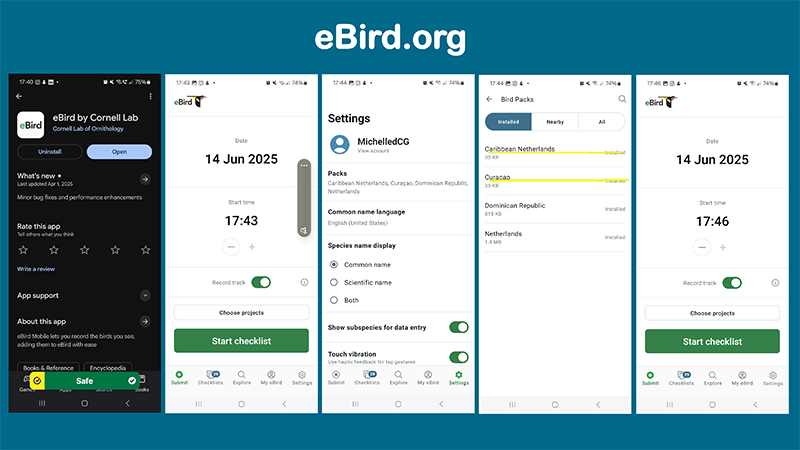
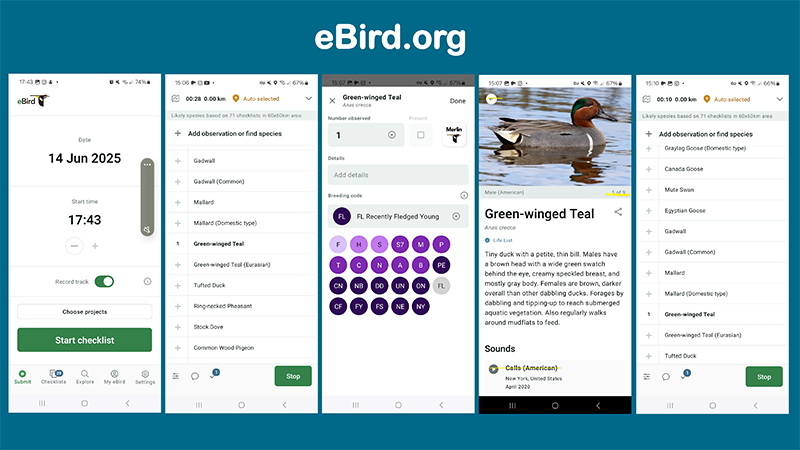
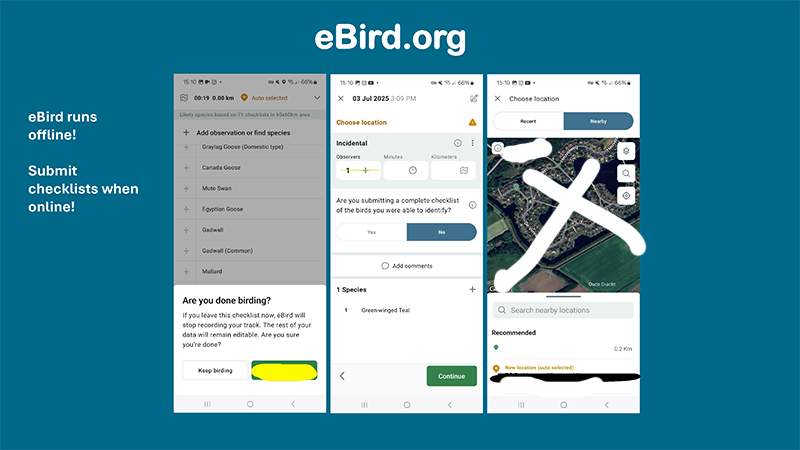
Create an account and you can immediately start creating counting lists with your phone. Are you counting birds in your garden? Then stand or sit in a strategic spot in the garden and wait 5 minutes before you start counting. Turn on the app and start a checklist. Count all the bird species you see and the number of birds of each species for about 15 minutes. When you are finished, stop the checklist with the green button (see photos of the app in the instruction illustration), select a location, indicate that you are submitting a complete checklist, and submit the checklist immediately if you have data on your phone. If you do not, you can also return to your list later and submit it when you have Wi-Fi. There are two counting methods in eBird that apply to counting on Global Big Day. You can count stationary, that is, from one (1) spot, but you can also record a track, and the app will keep track of exactly which route you walked, for example when counting in nature or in a large garden. Even then, it is important to count all the birds you see by species and the number of birds per species. This provides very valuable information about bird density and diversity in certain areas.
For your convenience, we have created a special overview with photos of the most common bird species you can find in the garden to help with identification. You can also use them to count by hand and later create a checklist with your account on eBird. Download the overview here:
If you are having trouble identifying a bird species, try taking a photo and sending it to us, or describe the animal in an email or message on our Facebook page Bird Watching Curaçao or on Caribbean Footprint or to info@caribbeanfootprint.com. Are you joining in too!?

Global Big Day – Samen vogels tellen op de hele wereld
Op zaterdag 9 mei is het weer zover. Wereldwijd wordt dan Global Big Day uitgevoerd. Een internationale dag, georganiseerd door Cornell Ornithology Lab, waarop duizenden mensen in de tuin en in natuurgebieden op zoek gaan naar land- en watervogels om deze te tellen. Daarmee wordt een snapshot genomen van de vogeldiversiteit en vogeldichtheid op de wereld. Iedereen op dezelfde dag actief. Alle telgegevens worden ingevuld op de website van eBird, www.ebird.org, zodat er een enorme database ontstaat van de vogeldiversiteit.
Naast de semi-wetenschappelijke gegevens die er verzameld worden is de dag vooral bestemd om mensen de natuur in te krijgen, om te gaan wandelen, vogels te zoeken en vooral te observeren. Alleen, in een groep, met het gezin of met vrienden.
Op alle drie de eilanden zijn er vrijwilligers die meedoen met Global Big Day door het veld in te gaan en vogels te tellen in de natuur. Daarnaast wordt er ook aangespoord om in de tuin te tellen. En dat duurt maar een kwartiertje, vanuit de luie stoel in de tuin of op de porch.
Voor het tellen van vogels kun je gemakkelijk gebruik maken van de eBird app dat te downloaden is via de bekende app-stores en ook te downloaden is via de website www.ebird.org. Zie de instructie sequentie hieronder voor het stapsgewijs aanmaken van een account, het instellen ervan en het maken van je eerste checklist.
Maak een account aan en je kunt direct beginnen met het aanmaken van tellijsten met je telefoon. Tel je vogels in je tuin? Ga dan op een strategische plek in de tuin staan of zitten en wacht 5 minuten voordat je begint met tellen. Doe de app aan en start met een checklist. Tel voor ongeveer 15 minuten alle soorten vogels die je ziet en de aantallen vogels van iedere soort. Als je klaar bent stop je de checklist met de groene knop (zie foto’s van de app hieronder), selecteer een locatie, geef aan dat je een complete checklist instuurt, en submit de checklist direct als je data op je telefoon hebt. Heb je dat niet, dan kun je ook later terug gaan naar je lijst en deze insturen als je Wifi hebt.
Er zijn twee telmethoden in eBird die van toepassing zijn op het tellen op Global Big Day. Je kunt stationair tellen, dat wil zeggen vanaf één (1) plek, maar je kunt ook een track recorden, en dan houdt de app exact bij welke route je hebt gewandeld als je bijvoorbeeld in de natuur aan het tellen bent of in een grote tuin. Ook dan is het van belang om alle vogels die je ziet te tellen op soort en aantallen vogels per soort. Dat geeft namelijk zeer waardevolle informatie over de vogeldichtheid en diversiteit in bepaalde gebieden.
Voor het gemak hebben we een speciaal overzicht gemaakt met foto’s van de meest bekende vogelsoorten die je kunt aantreffen in de tuin. Om te helpen bij het identificeren. Je kunt ze ook gebruiken om met de hand te tellen en later een checklist aan te maken met je account op eBird. Dit is het overzicht dat je kunt downloaden:
Kom je er niet helemaal uit met het identificeren van een vogelsoort, probeer dan een foto te maken en stuur die naar ons op, of beschrijf het dier in een mail of message op onze Facebook pagina Bird Watching Curaçao of op Caribbean Footprint. Doe jij ook mee!?